cases & bags

Showing posts with label portrait. Show all posts

Thursday, 2 June 2011

How does Picture Style work?

Picture Style is a Mode to adjust the contrast, colour tone, brightness and etc. Most digital camera comes with six picture style, I believe most of you heard them before. :)

1) Standard
- The colour of picture looks sharp and vivid overall. No doubt it is suitable for most shooting.


2) Portrait
- Do you remember the chapter "How to Use Portrait Mode"? Well, it is the same as the chapter mentioned. The skin tones are softer and lighter in Portrait.


3) Landscape
- Do you remember the chapter "How to Use Landscape Mode"? Again, it is the same. It is a setting to make red, yellow, green and blue more vivid.


4) Neutral 
- It makes the picture low saturation and contrast in order to obtain detail of the subject. The colour is subdued compare to Standard Mode.


5) Faithful 
- The colour of picture will look like the way you see with your eyes. This Mode emphasis the texture and colour same as the subject under colour temperature 5200k. You are advised to search for the temperature of colour. ^^


6) Monochrome
- The picture will convert into Black and White colour. To be honest, I like monochrome the most because it looks like the old black and white camera. the subject looks more 3D for me compare to colour photos. 


Do you want to know more? Please "like" my posts ^^

Thursday, 26 May 2011

How to Use Night Portrait Mode?

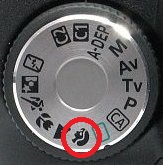
First, you need to select the Night Portrait Mode at the camera Mode Dial. You might found your Dial looks different, but I'm sure you can find the night icon ( In red circle) at the Dial :)


So, what does Night Portrait Mode do? Let's begin. These are the setting for my camera, but it will be about the same as yours as well. Do not worry ^^

Aperture = Auto
Shutter Speed = Auto
Exposure = Not Available
ISO Speed = Auto
Picture Style = Standard
White Balance = Auto
AF Mode = One Shot
AF Point Selection = Auto
Drive Mode = Single
Metering Mode = Evaluative
Built-in Flash = Auto

Do you remember the chapter "How to Use Portrait Mode"? There are 2 settings different between Night Portrait Mode and Portrait Mode. But there are some reason you are suggested to use Night Portrait Mode.

First, the Picture Style is Standard instead of Portrait. You need to capture a healthier and softer skin tone, don't you? As you can see, it is in the Night, the environment is assume in dark scene. Portrait Mode will make the picture lighter and softer, you will have a weird skin tone if you capture in a dark environment. 

Second, the Drive Mode is Single instead of Slow-Speed Continuous. Do you remember the chapter "How does Shutter Work"? This has something to do with the Exposure as well. When you shooting in the dark environment, it is difficult to get enough Exposure. The Shutter Speed probably will slow down in order to get more Exposure. Therefore, you cannot shoot continuous photos because you will capture blur images. 

Third, the Built-in Flash is in Auto. The Flash will fire automatically if the environment is too dark. This also why Slow-Speed Continuous Shutter Speed is not allowed. Flash needs time to charge before firing. There is no way a flash can charge in Continuous Shooting Mode... ...Unless you are in a Studio with more professional equipments.

Fourth, Night Portrait Mode instead of Auto Mode. If you want to capture the subject standing out more from the background, Night Portrait Mode is always the better choice while Auto Mode will only make the the background becomes black.  

However, just leave it to the camera to make a difficult night portrait. If you found the picture still blur, try to use a tripod or find something to steady your camera. 


Do you want to know more? Please "like" my posts ^^

Tuesday, 17 May 2011

How to Use Portrait Mode?

First, you need to select the Portrait Mode at the camera Mode Dial. You might found your Dial looks different, but I'm sure you can find the head icon ( In red circle) at the Dial :)


So, what does Portrait Mode do? Let's begin. These are the setting for my camera, but it will be about the same as yours as well. Do not worry ^^

Aperture = Auto
Shutter Speed = Auto
Exposure = Not Available
ISO Speed = Auto
Picture Style = Portrait
White Balance = Auto
AF Mode = One Shot
AF Point Selection = Auto
Drive Mode = Low-Speed Continuous
Metering Mode = Evaluative
Built-in Flash = Auto

Do you remember the chapter "Controlling the Depth of Field"? In Portrait Mode, you can't control the Aperture because it is in Auto. But, the camera is designed to use lower f-number Aperture in order to make the subject isolates from the background, which is making the subject stand out more while the background is blurred.


Portrait Mode also slightly control the colour to make the skin tones lighter and softer. If the environment is too dark, the flash fired automatically to give the subject's skin brighter and beautiful look.


Do you want to know more? Please "like" my posts ^^