cases & bags

Showing posts with label focus. Show all posts

Tuesday, 21 June 2011

Shooting in Automatic Depth of Field AE.

First, you need to select the Automatic Depth of Field Mode at the camera Mode Dial. You might found your Dial looks different, but I'm sure you can find the A-DEP icon ( In red circle) at the Dial :)


So, what does Automatic Depth of Field Mode do? Let's begin. These are the setting for my camera, but it will be about the same as yours as well. Do not worry ^^

Aperture = Auto
Shutter Speed = Auto
Exposure = Not Available
ISO Speed = Selectable
Picture Style = Selectable
White Balance = Selectable
AF Mode = Selectable
AF Point Selection = Not Available
Drive Mode = Selectable
Metering Mode = Selectable
Built-in Flash = Selectable

The objective of Automatic Depth of Field is to focus all subjects. Actually it sounds like compact camera to me because everything in target will be sharp and clear. The AF point is not selectable because all nine focus point well be in focused in order to capture close and everything clear picture. It works like Program AE but in different way.

A-DEP Mode is slightly similar with Close-Up Mode as well. The Aperture is in high f-number to narrow the depth of field. Therefore, all nine AF Point auto focus and narrow depth of field, it works just like "multi-focus" in compact camera. :)


By the way, since A-DEP Mode will automatically narrow the Depth of Field, the Shutter Speed will decrease in order to get enough Exposure. While you try to shoot a macro photography, slightly moved will cause blur result. Therefore, you are advised to use tripod or increase the ISO speeds.

However, users are allowed to control the picture style, white balance and etc to create special effect. 


Do you want to know more? Please "like" my posts ^^

Thursday, 9 June 2011

How does AF Mode work?

AF Mode is a setting to assist you in focusing the subject. While you shooting might not be a still subject, AF Mode can "track" the subject and keep it focused. 

The first thing you need to do is make sure your camera is in AF (Auto Focus) but not MF (Manual Focus). Basic Zone such as Auto Mode, Portrait Mode, Landscape Mode and etc are advised to use Auto Focus. While Creative Zone such as Shutter-Priority, Aperture-Priority and etc are advised to use Manual Focus, but you can select Auto Focus if you want to use other AF Mode to capture moving object. 


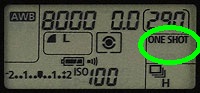
There are three AF Mode in most DSLR, you can see the camera setting, shown in the green circle. 


1) One Shot
- The camera will Focus once when you press Shutter Button halfway. If you need to re-Focus, you have to release the Shutter Button and press halfway again. This is suitable for still subject. 

2) AI Focus
- This AF Mode is suitable for moving subject. The focus distance will keep changing while you hold down the Shutter Button halfway. The camera will first focused by the center AF Point. If the subject move away, the camera will track the subject with another AF Point.

3) AI Servo
- AI Servo got a high focusing speed. The focus distance will keep changing while you hold down the Shutter Button halfway as well. The AF Mode will automatically switch from One Shot or AI Focus to AI Servo once the subject move away from the selected AF Point. 

However, If the focus cannot be achieved, the camera will not shoot even you press the Shutter Button completely. Unlike Manual Focus, you can shoot in any time even the subject is not focused. Of course, ALL Auto Focus AF Mode consume battery.


Do you want to know more? Please "like" my posts ^^

Tuesday, 7 June 2011

How does AF Point work?

What is AF Point? AF Point is the point you focused, or you want to be focused. You can see the AF
Point
in the Viewfinder. 


In Auto Mode including Portrait Mode, Landscape Mode and etc, AF Point is actually fully selected, or I should say the camera will try to focus the nearest distance at any AF Point of the camera most of the time. Therefore, the selection of the AF Point looks like this. 


When the AF Point is fully selected, it is quite annoying because you will see the Red Square keeps blinking on somewhere you do not want to focus. If there is a lot of things at the subject's background, the camera might focus on the background instead of the subject.  

In Manual Mode including Shutter-Priority Mode, Aperture-Priority Mode and etc, the AF Point is selectable. You can select one of these points as your desire AF Point by pressing the AF Button.


Some digital camera might not exactly looks like this, but you can look for a symbol which is dotted cross within a white box. Then, you can select your desire AF Point and you will see something like this. 


However, You are allowed to select any ONE of these points OR FULLY select the AF Point, but you  are NOT allowed to select the AF Point in this way.


Do you want to know more? Please correct me if there is any mistake ^^

Wednesday, 11 May 2011

How to Focus in a Correct Way?

Although there are lot of people afford to buy a camera, there are still a lot of people do not know how to Focus in a correct way. Surprise?

Most of the people got a camera in their hand, and they keep shooting because they have a large capacitance memory card. Unlike the film camera, it is very expensive if they keep shooting the environment or stranger for no reason. No offense ^^. Then, when they print the photos or view in the large LCD television or monitor, they found some of the photos not clear or sharp enough. The reason they can't capture a clear and sharp photo because they do not Focus.


The red circle shows the Shutter Button. It is not just a normal button because this button allows you to press halfway to Focus the subject. Most camera will focus the subject appear at the center of the Viewfinder (or LCD monitor for compact camera).

Well, you might think that you have a smart and intelligent camera, you do not need to worry whether you need to Focus before capturing the picture. Maybe you really have a smart and intelligent camera, but you can have a clearer and sharper picture if you know the correct way to Focus, it worth a shot :)

So, use your index finger press the Shutter Button gently to feel the difference between "press halfway" and "press completely". By the way, when you press halfway to Focus, probably you will heard a beep sound once your camera focused the subject. Also, you can see the LCD monitor image from blur to clear because the camera is focusing the subject, and you are good to go. Easy :)